iPhone · Android
Your training.
In your hands.
See the session you planned, then record the load, repetitions and effort you actually performed. Movement guidance stays close when you need to check an instruction.
Later, compare the completed work with the plan on your phone or in the portal.
Goals & targets
Set a direction for your training.
Choose a goal and weekly targets you can revisit. See the next planned session on Today, with your settings available when priorities change.
Define a training goal.
A goal provides a reference point for programme selection, independently planned sessions and recorded training review.
Select training priorities
Strength, endurance, mobility and stability define Lifty Fifty’s four training pillars.
Define the outcome
Examples include barbell strength, a lifting milestone or a consistent weekly training pattern.
Review the goal
Compare the goal with training history and update it when priorities change.
Training profile and programme selection.
Record the training context that informs programme selection, then choose a structured programme or independently planned session.
Experience and equipment
Programme pages state commitment, prerequisites and intended audience before enrolment.
Training approach
Follow a structured Lifty Fifty programme or record independently planned sessions. Both approaches use the same training record.
Initial session
Programme selection leads into a schedule and session preview. Today identifies the next session.
Editable settings
Goals and weekly targets remain available after onboarding and can be revised as priorities change.
Weekly target metrics.
A goal defines the intended outcome. A training target defines the sessions and sets to track. A completed weekly target is distinct from a measured gain in strength or muscle.
Strength
Track heavy sets against the weekly target you choose. Open the underlying training to see what contributed.
Endurance
Review repeated work and session continuity alongside the targets you choose.
Mobility
Record mobility work and review the movements you choose to practise.
Stability
Keep balance and control work in view as part of the training week.
Edit from your phone
Reach target settings from the rings and your profile. Review the same choices in the portal. Adjusting a target leaves your recorded training intact.
 F
F Weekly targets
SampleWeekly target tracking.
Sample settings. Targets describe recorded training; they do not measure gains in strength or muscle.
Adjust a sample target →Goal definition and weekly targets.
The sample goal and strength target appear together on Today. Each priority is reviewed independently; one goal does not modify other settings.
Review your progressSample target configuration
Training goal and weekly target.
Strength target: 12 heavy sets this week.
Workout recording
The plan beside the set.
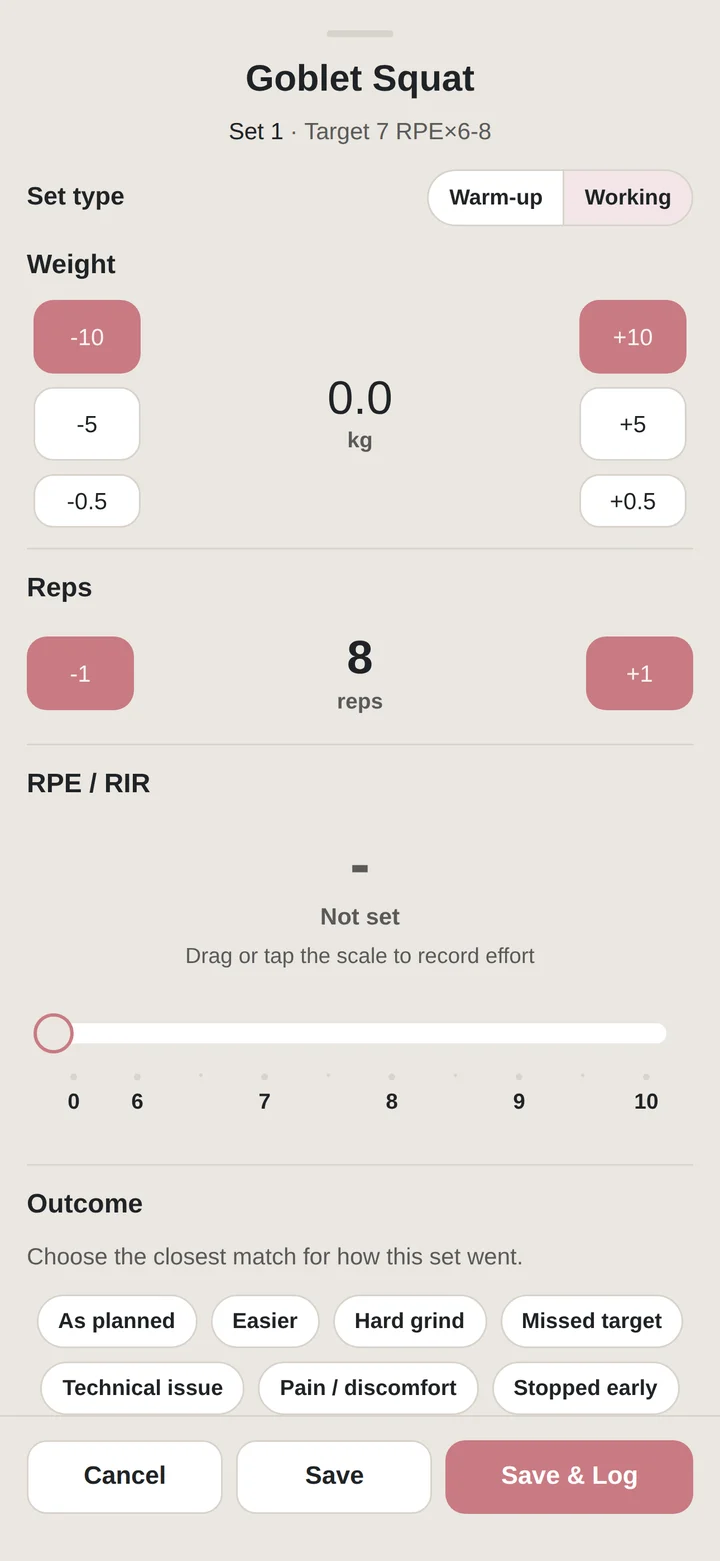
Check the target before lifting. Record what you actually did, including load, repetitions and effort, then return to the next set without losing your place.
Session structure.
The session remains in its authored order from preparation to final assistance. Detailed instructions remain available without obscuring the active set.
The planned work
Keep target weights, rep ranges, effort, tempo and rest beside the set. See what comes next without losing your place.
Preparation and working sets
Follow warm-ups and lift-specific ramp sets before the main work. Keep different set roles clear in the record.
Assistance and pairings
Move through secondary lifts, pulling work and paired assistance in the intended sequence.
A changing training week
Move a scheduled session when life changes. When equipment is taken, inspect alternatives and keep the original programme intent available.
Record set data.
Record the set, then add the information required for later review. The record can include more than load and repetitions.
Load and reps
Record what you actually lifted. Planned targets remain separate, so the review can show where the session matched or changed the plan.
Effort and execution
Keep RPE, RIR, tempo and rest alongside the set. Notes add context that a load chart alone cannot explain.
Individual reps
Open rep-level information when you need a closer record of the set.
Movement-specific measures
Capture the relevant work, including duration and distance where the movement calls for them.
Your observations
Remember the useful details: how a set went, why you changed it, or something to revisit next time.
Reference material in session.
Consult movement guidance, earlier sets or loading tools without leaving the session.
Movement guidance
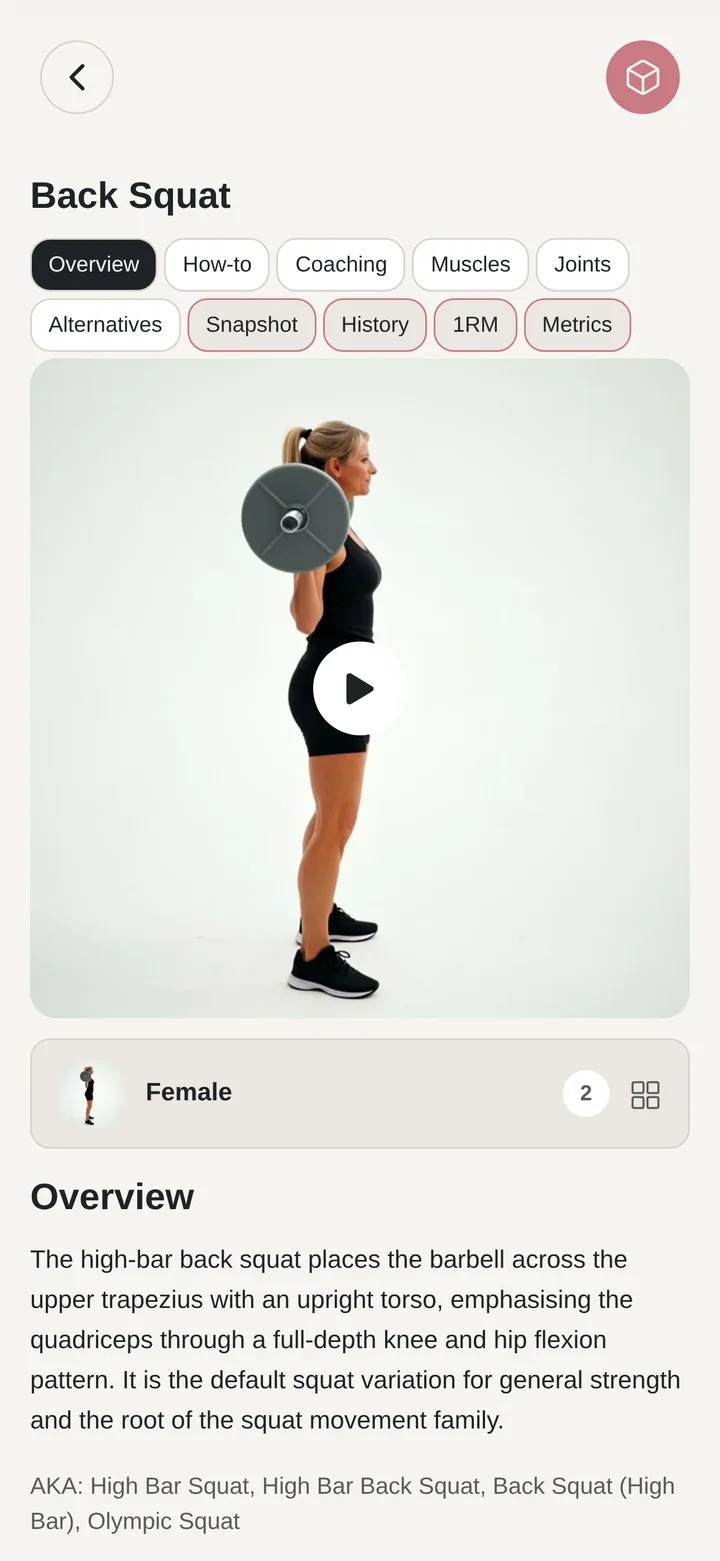
Watch the demonstration, check the setup and read the coaching points for the lift you are about to perform.
Plate Pilot
Translate a target into the plates on the bar. Match your gym setup and inspect the per-side breakdown.
Previous training
Revisit earlier recorded sets and accepted strength records for context. Make your own decision about today’s work.
Review the session
See the completed session and the information you recorded before moving on.
Movement guidance
Movement technique and anatomy.
Review movement demonstration, setup, execution, muscle roles and joint involvement. The reference remains available beside the active session.
Movement technique.
Move from seeing a lift to understanding how to approach it. Keep the demonstration and written guidance within reach of your session.
Movement video
Watch published Lifty Fifty demonstrations for supported movements. See the setup and execution rather than relying on a name alone.
How to perform it
Read the starting position, movement sequence and finishing position. Return to the part you need before a set.
Coaching notes
Look through practical cues, common errors and cautions to understand the movement more fully.
Movement identity
Navigate names, equipment and variations while keeping the underlying movement clear.
Muscle and joint involvement.
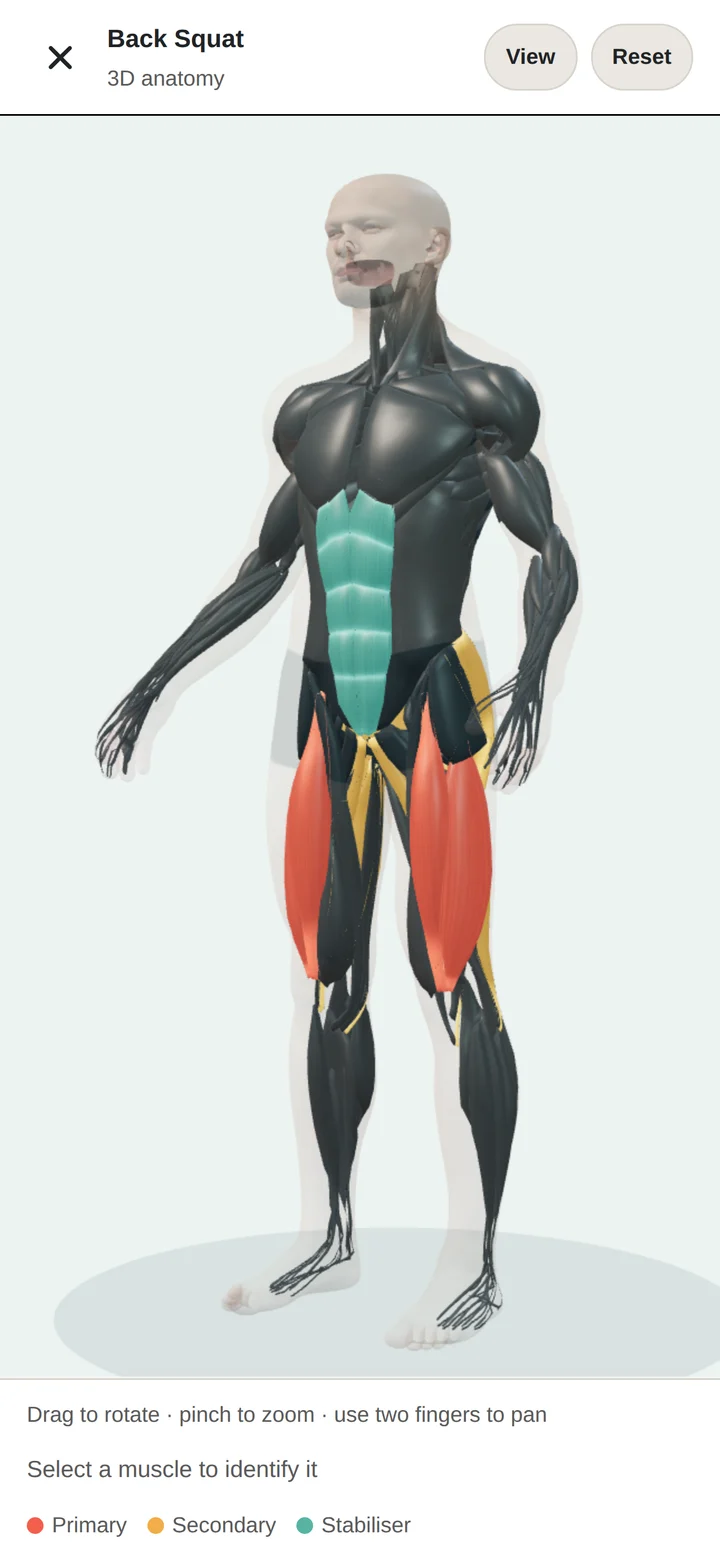
Interactive 3D anatomy makes the underlying information easier to explore. Move between the lift, the muscles involved and the joints that participate.
Muscles
Inspect primary, secondary and stabilising roles. Move from an anatomical view into the supporting movement detail.
Joints
Understand which joints are involved and explore the related movement guidance and cautions.
Multiple views
Explore the body from different angles and focus on the area you want to understand.
Useful context
The anatomy view describes movement involvement. It does not measure your individual muscle growth, activation or joint health.
Reference material and training history.
Open the reference when you need it, then return to the session, programme or history that prompted the question.
Alternatives
Inspect related movements and equipment options before choosing a swap. Keep the original plan visible in the training record.
Your history
See earlier recorded sets for the movement, including relevant strength records.
Programme context
Understand where the lift appears in your programme and how the planned sets compare with what you completed.
Library depth
Explore 900+ movement definitions, 3,500+ names and aliases, 150+ muscle references and 30+ joint references. Video coverage varies by movement.
Progress
Progress with the detail behind it.
Compare sessions, lifts and programme blocks, then open the recorded sets behind a change.
Recent training history.
Start with a completed-session recap, a lift comparison or a recent record. Each view leads back to the sets and sessions behind it.
Your lift history
Follow recorded sets across time. Look at load, reps and effort together, then open the sessions behind a change.
Records with context
Keep accepted 1RMs, estimated strength evidence and personal records clear. A planned increase is different from an improvement you actually recorded.
Personal milestones
Mark useful points in your training: a completed block, a recorded lift milestone or a week you followed through on.
Your next step
Move from a review to the programme or session you are following. The record gives you context for your next choice.
Programme progression.
Look beyond a single workout. Relate completed sessions to the week, block and programme they belong to, with the authored plan available beside them.
Programme continuation
Know the current week and phase, the sessions you have completed and the sessions still ahead.
Planned and completed
Compare programme intent with recorded training across the session, week, block and whole programme.
What you trained
Explore the movements, muscles, body areas and joints involved in your recorded sessions.
Changes you can inspect
See the effect of swaps, missed sessions and additional movements on the training record. The facts stay available for your own judgement.
Records behind the summary.
Use the overview to find the session history, lift records and completed sets behind a summary.
Session Replay
Revisit the workout in sequence, with the planned and performed sets, movement detail and notes together.
Weekly targets
See recorded sessions against the targets you chose. Change future commitments deliberately, without turning activity totals into a score for your fitness.
Strength levels and rep ranges
Use strength references and recorded rep-range evidence for context, alongside the individual sets that support them.
Body metrics
Keep measurements and their history alongside your training. Review changes over time without attributing every change to a single workout.
The portal
Review a programme or block on a larger screen, using the same training history.
Active programme
An active programme in context
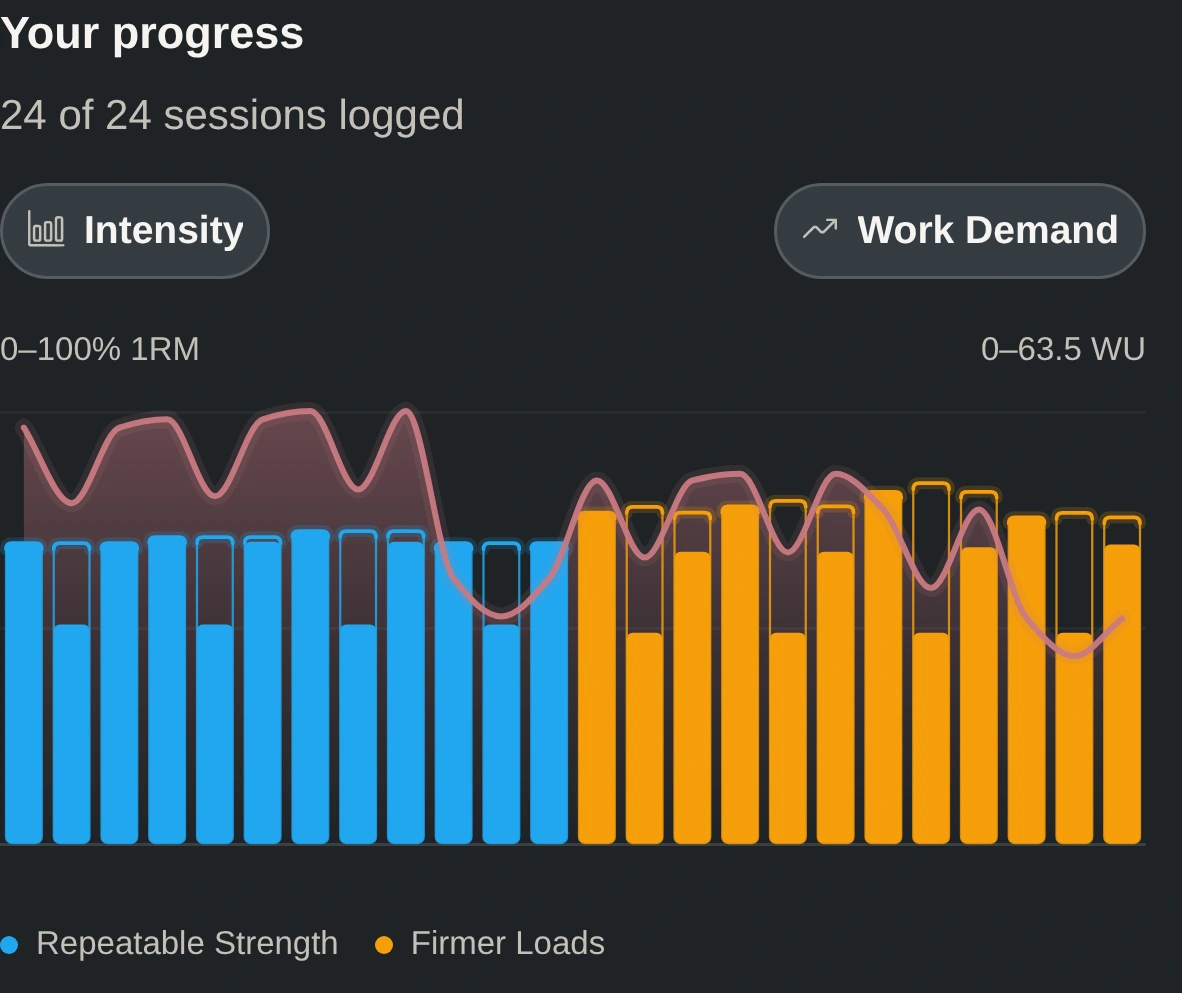
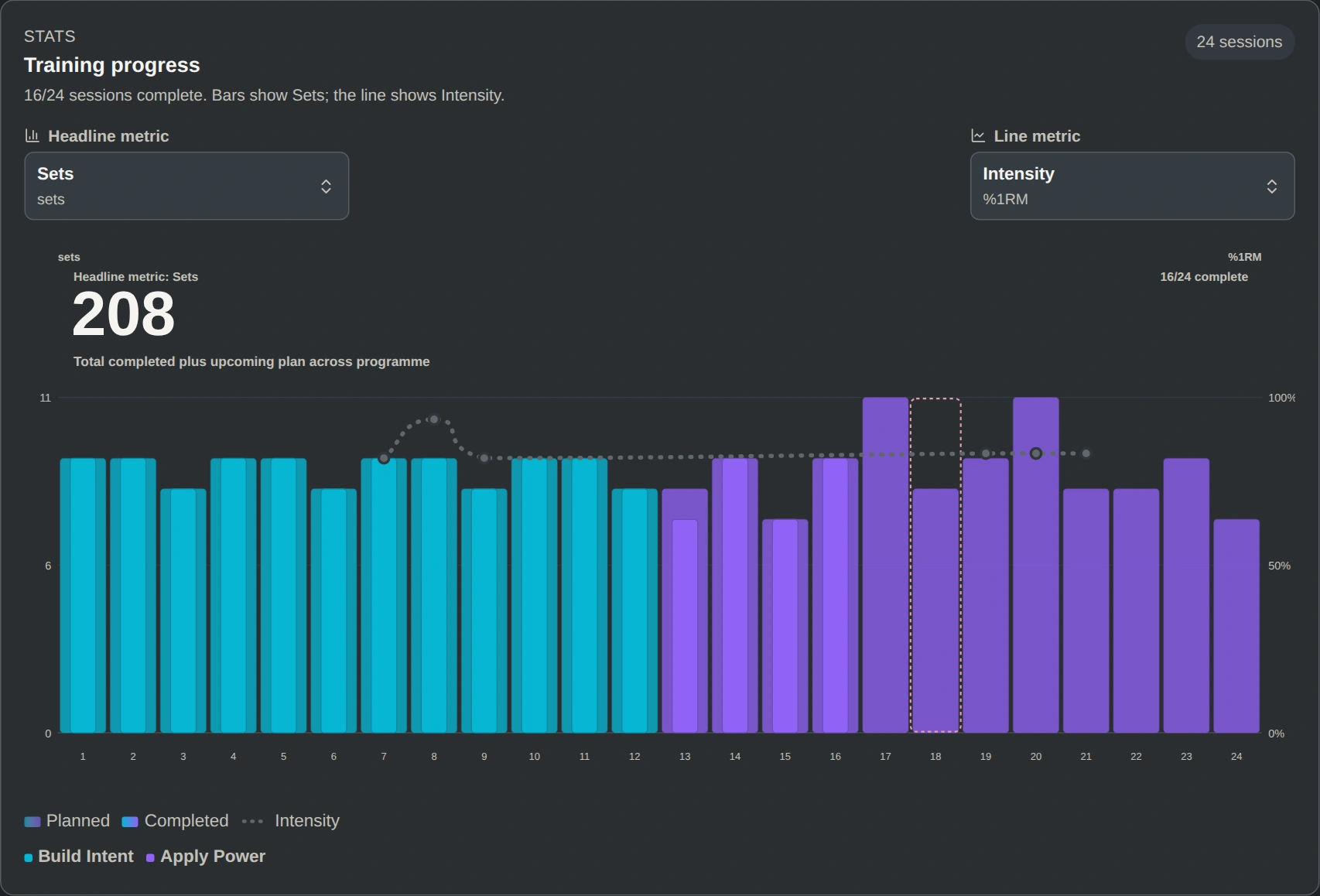
Practical Power: Foundation Block shows 16 of 24 sessions completed across Build Intent and Apply Power. Bars show total sets, and the line shows intensity.
Training analysis
Ask better questions of your record.
Which sessions changed? How did load, repetitions or effort compare? Follow a summary back to the sets that produced it.
Counts describe recorded work. For definitions, calculations and limits, use the Lifty Fifty metric reference.